
How to Play Amazing Amazonia
Bet, spin, collect or gamble: the controls and rules of the Amusnet slot in four simple steps.
Learning how to play Amazing Amazonia takes a few minutes. The Amusnet slot has 5 reels, 10 fixed lines and one decision before each spin: the size of your total bet. This page walks through the controls, how a win is paid, what triggers the bonus rounds and how to use Autoplay safely.
Game Basics
Each spin follows the same basic format. The table below outlines the key elements. The Amazing Amazonia overview covers the base rules and symbols.
| Reels | 5 reels with 3 symbols each |
| Lines | 10, always active |
| Your choice | Total bet, from $0.10 to $100 |
| Wins | Left to right on adjacent reels |
| Wild | Amazon River, doubles wins it completes |
| Scatter | Blue butterfly, pays anywhere |
| Bonus | 20 free spins at x3, Gamble, Jackpot Cards |
Step 1: Choose Your Bet
The value shown on each bet button is your total wager for all 10 lines. Your bet per line is that amount divided by ten.
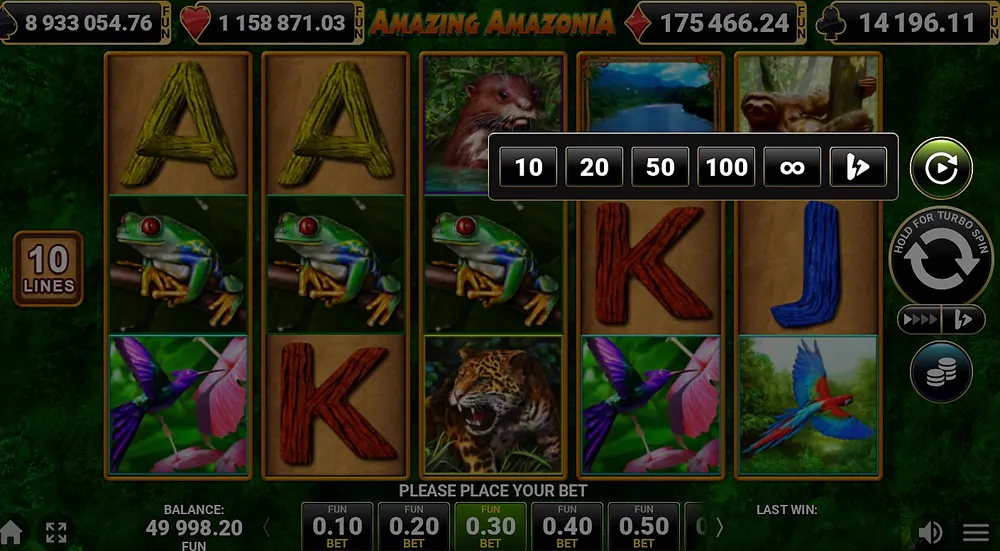
A strip below the reels displays several stakes. Use the arrows to scroll. The coin stack button reveals all 40 bet levels, from $0.10 to $100. Your current choice is marked in green.
- $0.10 total = $0.01 per line
- $1 total = $0.10 per line
- $10 total = $1 per line
- $100 total = $10 per line
Step 2: Spin the Reels
You can spin in two ways. Click the big round Start button. Or, press any bet button to set that stake and spin immediately.
As the reels turn, the bet buttons change to Stop All. Press one to halt the reels instantly.
| Start button | Spins at the selected bet |
| Hold Start | Turbo Spin, faster reels |
| Bet button | Places that bet and spins |
| Stop All | Stops all reels at the same time |
| Space key | Starts or stops a spin on desktop |
| Fast Play | Four reel-stop speeds |
Step 3: Read the Result
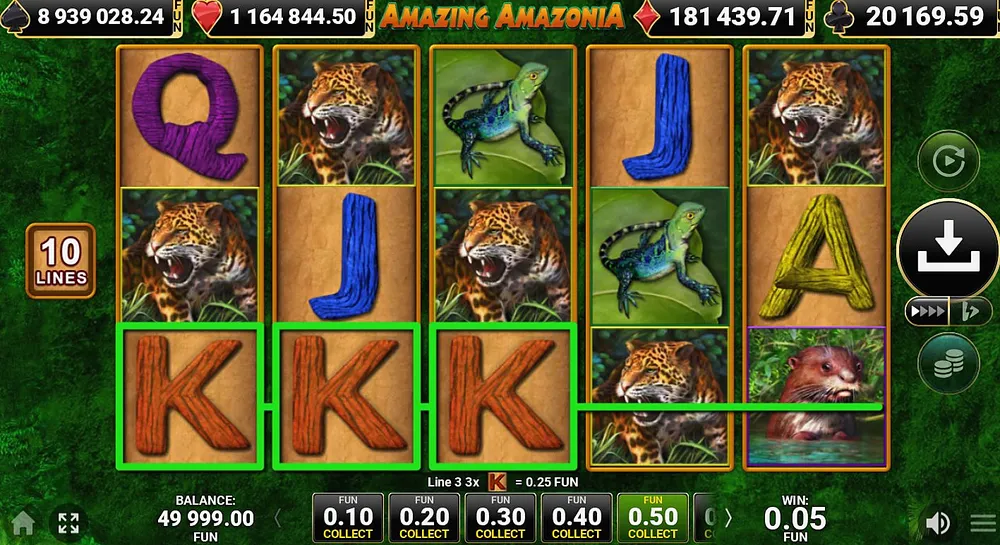
A winning line is drawn across the screen and the symbols are framed. Text below the reels states the line and payout, like "Line 6, 3x A".
The Win box on the right shows your total for that spin. It adds line wins and butterfly wins. Only the highest win per line is counted.
Step 4: Collect or Gamble
After a win, two buttons appear by the reels. One collects your money, the other starts the Gamble feature.
- Press Collect to move the win to your balance
- Or press the x2 button to open the Gamble screen
- In Gamble, pick Red or Black for the face-down card
- A correct guess doubles the amount, a wrong one loses it
- Starting the next spin also collects any open win
The Gamble feature caps wins at a maximum shown in the rules. Prizes from Jackpot Cards cannot be gambled.
How Winning Lines Work
The paytable is concise, but certain rules are important. They determine payouts when symbols appear together on a line.
- Three of a kind is the minimum for most symbols
- Wild, leopard, monkey, J and butterfly also pay for two
- A Wild in the line doubles the win, once per line
- A line of Wilds alone is paid at the Wild value, without doubling
- Wins on different lines are added together
Bonus Rounds You Will Meet
Bonus rounds are not selected manually. They trigger automatically when certain symbols land or at random.
| Feature | How it starts | What you get |
|---|---|---|
| Free spins | 3, 4 or 5 butterflies anywhere | 20 spins, every win x3 |
| Retrigger | 3 or more butterflies in the round | 20 more spins |
| Jackpot Cards | Random, after a finished spin | Pick cards until 3 suits match |
| Gamble | Your choice after a win | Red or black, double or lose |
Using Autoplay
Autoplay is in the menu's second tab. Select 10, 20, 50, 100 or unlimited spins and click Play Now. The Stop Auto button displays a countdown of remaining spins.
Configure a stop condition before beginning. Stopping when your balance decreases by a set amount is the most effective protection against an extended losing streak.
- Pick a fixed number of spins rather than unlimited
- Set the balance-drop stop at your session budget
- Autoplay pauses for Jackpot Cards and resumes after
- Press Stop Auto at any time to end it
Beginner Checklist
Run through this list before your first cash session.
- Try the free demo on the Amusnet site first
- Pick a stake that gives you at least 100 spins of budget
- Check the paytable at that stake in the Information screen
- Decide in advance if you will use the Gamble button
- Set an Autoplay loss stop if you use Autoplay
FAQ
Select your total bet and press Start. Wins pay left to right on 10 fixed lines. Three butterfly scatters trigger 20 free spins.
No. All 10 paylines are permanently active. You can only adjust your total bet amount.
It starts a Gamble round. Guess the correct card color to double your win, or press Collect to keep the current amount.
Land three or more blue butterfly scatter symbols anywhere. This awards 20 free spins, and all wins during these spins are tripled.
Hold the Start button for a faster spin. Fast Play offers four reel-stop speeds. Ultra Play runs Autoplay without the spinning animation.
The game saves an unfinished spin exactly as it was. Any pending win is retained when you return.
Responsible Gambling
Knowing the controls does not change the odds of any spin. Only adults of legal gambling age in their state should play with real money. Pick a session budget and a stop time before you press Start. If play stops feeling like fun, call 1-800-MY-RESET (1-800-697-3738) or visit ncpgambling.org.